Weather100's e-paper display enriches daily forecasts with 100 years of historical weather data, offering a unique perspective on local conditions.
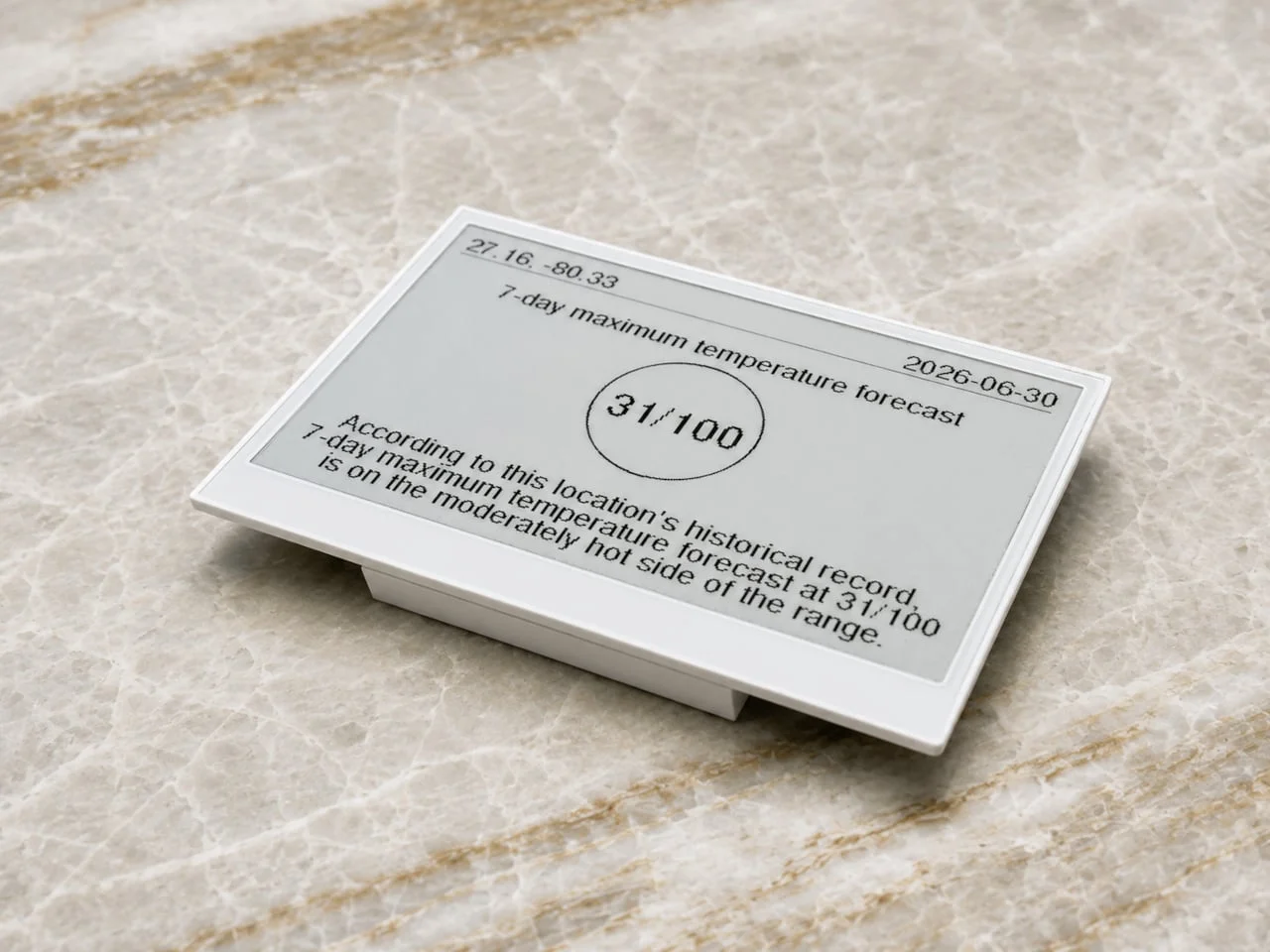
Weather100’s e-paper display is redefining how we understand daily weather forecasts by situating current conditions within a historical framework. By comparing local weather metrics against a century of data, this gadget elevates a simple temperature reading into a richer context, revealing just how unusual or typical today's weather is. This approach could fundamentally alter how users perceive and react to daily weather, transforming it from a mundane routine to a more analytical experience.
The interface is intentionally minimalist, featuring a clear presentation with the current weather measurement prominently displayed. Each display includes a ranking of how today's conditions measure up against the historical data, coupled with a brief explanation to clarify the significance of that ranking. Coordinates and the date are clearly marked at the top, ensuring users instantly understand the relevance of the data being presented. This stripped-back design not only emphasizes the data but also avoids overwhelming users with extraneous information, a common pitfall in many tech products today.
Currently designed by Fergus Keatinge, the device's user interface avoids clutter, allowing one key metric to shine alongside its historical ranking. For example, a rating of 1 out of 100 indicates today's maximum temperature is the hottest on record for that specific date, rather than the hottest day overall, providing a nuanced understanding of what that number means. This level of detail and contextualization could enhance users' appreciation for the science of meteorology, but it also raises questions about how easily such information can be interpreted by the average consumer.
Display Specifications
The Weather100 Pro model boasts a 10.2-inch display encased in a machined white metal frame, providing a sophisticated yet functional look. Priced at $179.99, it includes a desktop stand and supports both wall and magnetic mounting. Its frame dimensions resemble that of a traditional picture frame, making it easy to integrate into various spaces without resembling an intrusive tech gadget. This thoughtful design could appeal to consumers who want technology in their homes but don’t want it to dominate their décor.
For those with limited space, the smaller 4.2-inch Mini model costs $79.99 and offers the same features with a selection of colorful enclosures for a more casual aesthetic. These displays utilize e-paper technology, which reflects ambient light, offering visibility without the drawbacks of backlighting. A rechargeable battery enhances versatility, allowing placement away from power outlets, freeing users from messy cords. This aspect could expand its appeal significantly, especially for those who value both aesthetics and functionality.
Connectivity and Features
Once connected to Wi-Fi, the displays refresh their rankings daily between 7 a.m. and 8 a.m. local time. Weather100 also provides an optional mobile app for iOS and Android, allowing users to change locations and explore data from different regions, though it’s not necessary for the setup. Physical controls on the device can hide explanatory details or rotate the screen, offering flexibility without needing to access the app. This dual approach allows for a range of user experiences, catering to both tech-savvy individuals and those who prefer simplicity.
The daily update cycle is especially beneficial for identifying patterns over time, such as an unusually dry month, rather than tracking immediate weather events. However, while these rankings are influenced by forecast data, the company hasn’t publicly detailed the historical datasets they rely on or any potential gaps in local records. Users should regard these comparisons as a contextual enhancement rather than as definitive warnings. The lack of transparency could lead to misunderstandings. (And this is the part most people overlook.) If you find yourself relying heavily on this data for significant decisions, that opacity might be a problem.
Subscription and Ongoing Costs
It’s important to note that using the Weather100 display entails ongoing costs. The initial purchase includes a year of data services, after which users will need to pay $12 annually to continue receiving updates. Failure to renew the service means the display will revert to showing a renewal message instead of fresh data. This recurring fee raises questions about the product's long-term value. Thus, while it appears as a static piece on the wall, its functionality relies on an active subscription. That said, consumers might find themselves questioning whether the continuous updates justify the added expense.
Future Outlook and Implications
What this means for you is that the Weather100 could signal a shift in how we engage with weather data. As more consumers seek personalized and contextualized information about their environment, products like this might become increasingly prevalent. While it offers an engaging way to connect with local weather patterns, its pricing model and reliance on ongoing fees could pose hurdles for widespread adoption. If Weather100 succeeds, expect competitors to follow suit, potentially saturating the market with similar devices.
Yet, this burgeoning market for data-driven environmental displays also raises questions about data privacy and the ownership of weather information. Will consumers be comfortable providing their location data to a product like this? As weather becomes more commodified, the implications for how we access and interpret it are only just beginning to unfold. The Weather100 display, while intriguing, is just one piece of a larger puzzle.


Discussion
Sign in to join the discussion.