Explore expert tips for integrating TVs into home design, ensuring your screen complements your space rather than overwhelms it.
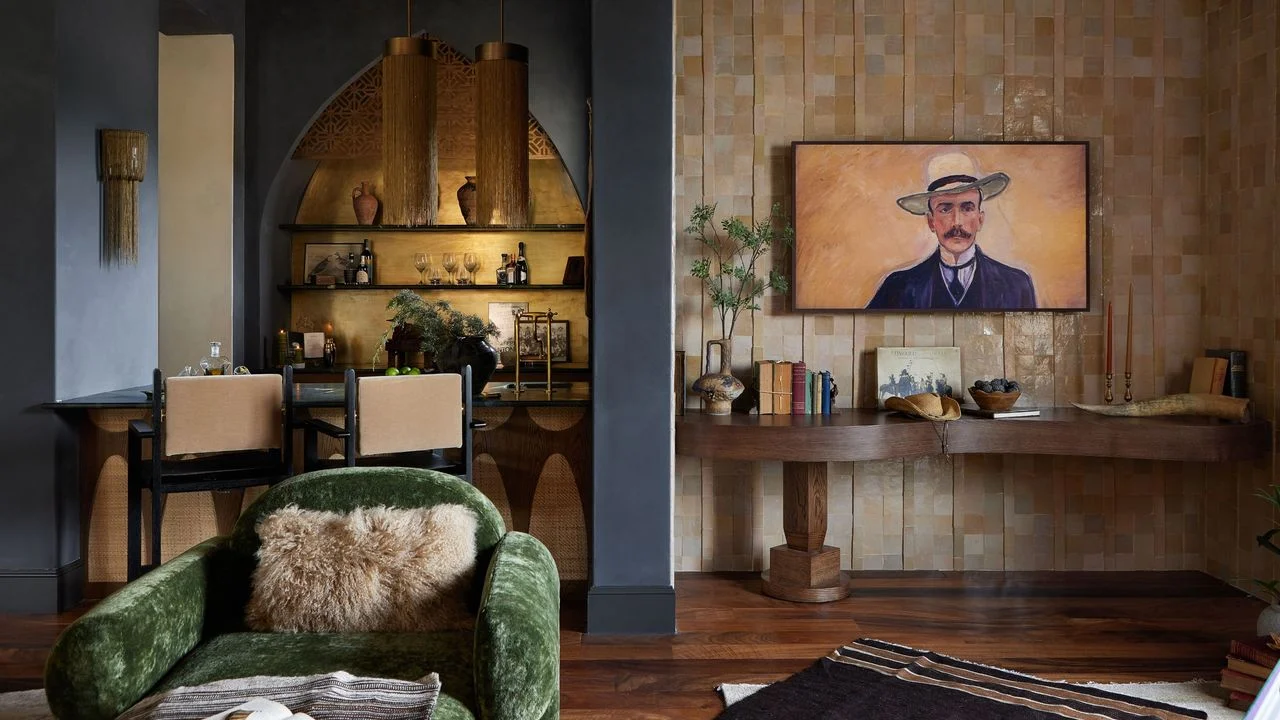
Gone are the days when a television's sole purpose was to entertain. In contemporary living spaces, the TV has evolved into a focal point of home design, necessitating a thoughtful approach to its placement and integration into the overall décor. Whether you're aiming for a design that enhances the ambiance rather than dominating it, careful consideration is now critical to avoiding common pitfalls.
Define the Room's Functionality
Charlie McCourt, co-founder of the smart home design company Equippd, emphasizes the importance of establishing the room's intended purpose. "After all," he notes, "the function of the space directly influences how you should approach your TV." In dedicated media rooms, for example, selecting the right screen size, height, and viewing distance is vital since the primary activity is watching the television.
On the flip side, in rooms meant for multifunctional use, integrating a TV can be more subtle. Options such as mirror TVs, artwork, or cleverly designed storage can help the screen blend seamlessly into the environment when it’s not in use. "Sometimes, it's worth reconsidering whether a TV is necessary for a particular space," shares Ginger Curtis, founder and CEO of Urbanology Designs. "Think outside the box—there could be non-traditional areas in your home where a TV might thrive."
Manage Wires and Connections
One fundamental design mistake involves overlooking cable management. According to McCourt, cables can significantly detract from a room's aesthetic, which is why it's essential to plan for power, data, and ventilation early in the design process. "When you're coordinating bespoke cabinetry or planning for concealed screens, you need to address cable routes from the start," he advises. "Fixing these issues post-installation is often cumbersome and costly," he adds.
Control Systems and Remote Usage
Designing an elegant viewing space means little if you can't easily operate your devices. McCourt urges designers to consider how to manage controls effectively. In a dedicated cinema room, integrating television, lighting, and climate control can create an effortless experience—one button does it all. However, in typical living areas, a single, user-friendly remote may suffice. The key is functionality over complexity; your setup should simplify the viewing experience.
Prioritize Viewing Comfort
Integrating a TV without considering viewing comfort is a common misstep. Positioning your TV too high, particularly above a fireplace, can create discomfort during extended viewing. James Thomas, senior product manager at LG Electronics, suggests that the screen's center should align with the viewer's eye level when seated. "This alignment fosters comfort and prevents strain," he states.
Assess TV Size and Furniture Arrangement
When selecting a television, size matters, but it shouldn't become a disproportionate centerpiece. "Often, we see oversized TVs that feel out of place, especially when mounted above smaller furnishings," explains Curtis. "It disrupts the visual balance." Thomas reinforces this by advising that seating should be positioned roughly 1.5 to 2.5 times the screen size away from the TV for optimal immersion.
Enhance the Surrounding Space
Consider making the area surrounding your TV just as impactful as the screen itself. "Utilizing cabinetry, shelving, or wall treatments can elevate the TV's presence while keeping it integrated into your décor," Curtis suggests. If achieving a flush look isn’t feasible, simply painting the wall behind the TV in a deeper hue can help the device seem framed. For those who prefer discretion, contemporary solutions include automated panels or artwork that can hide the screen when not in use.
Ultimately, integrating a television into your home requires more thought than simply mounting it on the wall. Utilizing these insights allows for creative and aesthetically pleasing solutions that work effectively in various spaces, whether large or small. For those navigating compact environments, additional resources can guide TV positioning choices that maximize both style and function.


Discussion
Sign in to join the discussion.